Streamlit vs Gradio vs Panel: Which Python Web Framework Should You Use in 2026?
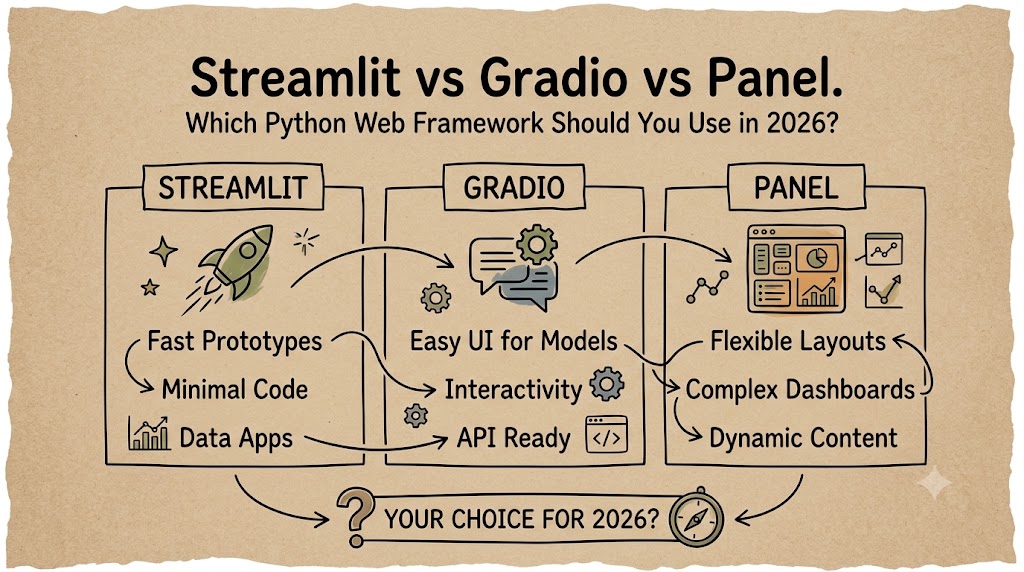
You have a Python script. You want a web UI. In 2026, three frameworks dominate the “no-frontend” landscape: Streamlit, Gradio, and Panel. Each takes a fundamentally different approach to the same problem — turning Python into interactive web apps without writing HTML, CSS, or JavaScript.
This guide cuts through the noise. No marketing fluff, no “it depends” without explanation. By the end, you’ll know exactly which one to pick for your next project.
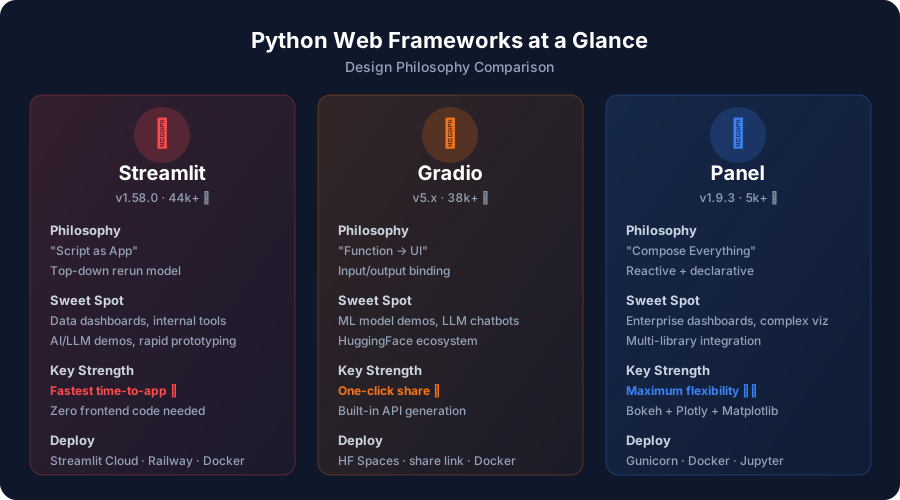
TL;DR — The 30-Second Answer
| If you’re building… | Use this |
|---|---|
| A data dashboard or internal tool | Streamlit |
| An ML model demo or LLM chatbot | Gradio |
| A complex multi-library visualization | Panel |
Still here? Good. Let’s go deep.
The Core Philosophy Difference
Before comparing features, understand the mental model each framework expects you to adopt. This is the single most important factor in your choice.
Streamlit: “Script as App”
Streamlit treats your Python script like a document. It runs top-to-bottom, every time a widget changes. There’s no server setup, no routing, no component lifecycle. You write a .py file, run streamlit run app.py, and get a web app.
import streamlit as st
st.title("My App")name = st.text_input("Your name")st.write(f"Hello, {name}!")The rerun model is Streamlit’s superpower and its constraint. It’s dead simple to reason about — but if your app has expensive computations, you’ll need @st.cache_data or @st.fragment to avoid re-running everything.
Gradio: “Function → UI”
Gradio thinks in terms of inputs and outputs. You define a Python function, tell Gradio what goes in and what comes out, and it generates the UI automatically.
import gradio as gr
def greet(name): return f"Hello, {name}!"
gr.Interface(fn=greet, inputs="text", outputs="text").launch()This makes Gradio unbeatable for ML demos: your model is already a function with inputs (image, text, audio) and outputs (prediction, generated text, processed image). Gradio just wraps it.
Panel: “Compose Everything”
Panel is the most architecturally mature of the three. It offers three distinct APIs — reactive expressions, declarative parameterized classes, and imperative callbacks — and can render visualizations from Bokeh, Plotly, Matplotlib, HoloViews, and Altair in the same app.
import panel as pn
pn.extension()
slider = pn.widgets.IntSlider(name="Value", start=0, end=100, value=50)
@pn.depends(slider)def show_value(value): return f"Selected: {value}"
pn.Column(slider, show_value).servable()Panel doesn’t force a rerun model. Widgets update reactively, and only the affected components re-render. This makes it the best choice when you need fine-grained control over what updates and when.
Feature-by-Feature Comparison
Here’s the honest breakdown across the dimensions that actually matter:
| Dimension | Streamlit 1.58 | Gradio 5 | Panel 1.9 |
|---|---|---|---|
| Learning curve | ⭐ Easiest | ⭐⭐ Easy | ⭐⭐⭐ Moderate |
| Time to first app | ~5 min | ~5 min | ~15 min |
| UI customization | Limited | Moderate | Extensive |
| Reactivity model | Full rerun | Function binding | Reactive/declarative |
| Multi-page support | Built-in (native) | Blocks API | Via templates/routing |
| Chat/LLM support | st.chat_message | gr.ChatInterface | pn.chat |
| Streaming output | ✅ Native | ✅ Native | ✅ Native |
| Built-in auth | st.login (OAuth) | Basic | Via external |
| Mobile responsive | ✅ Good | ✅ Good | ✅ Good |
| Data tables | st.dataframe (fast) | gr.Dataframe | pn.widgets.Tabulator |
| Chart libraries | Built-in + Altair/Plotly | Matplotlib/Plotly | Bokeh/Plotly/Matplotlib/HoloViews/Altair |
| File uploads | ✅ | ✅ | ✅ |
| WebSocket support | Via Starlette | ✅ Native | ✅ Native |
| Custom components | Streamlit Components | Custom Gradio components | AnyWidget / JSComponent |
| GitHub stars | ~44,800+ | ~38,000+ | ~5,000+ |
| Backed by | Snowflake | Hugging Face | HoloViz (OSS community) |
Code Comparison: Same App, Three Ways
Let’s build the same thing in all three frameworks — an interactive line chart with a slider control. Judge the ergonomics yourself.

Streamlit (15 lines)
import streamlit as stimport pandas as pdimport numpy as np
st.title("Sales Dashboard")
# Sidebar controlsn = st.slider("Points", 10, 500)chart_type = st.selectbox("Chart", ["Line", "Area"])
# Generate & renderdf = pd.DataFrame( np.random.randn(n, 3), columns=["A", "B", "C"])
st.line_chart(df)Gradio (18 lines)
import gradio as grimport pandas as pdimport numpy as np
# Define the functiondef make_chart(n, chart_type): df = pd.DataFrame( np.random.randn(n, 3), columns=["A", "B", "C"] ) return df
# Bind inputs → outputsgr.Interface( fn=make_chart, inputs=[gr.Slider(10, 500, value=100), gr.Dropdown(["Line", "Area"])], outputs="dataframe").launch()Panel (22 lines)
import panel as pnimport pandas as pdimport numpy as np
pn.extension("tabulator")
# Reactive widgetsn = pn.widgets.IntSlider( name="Points", start=10, end=500, value=100)
# Reactive expression@pn.depends(n)def chart(n): df = pd.DataFrame(np.random.randn(n, 3)) return df.hvplot.line()
# Compose layoutdashboard = pn.Column(n, chart)dashboard.servable()Observations:
- Streamlit is the most concise. The slider automatically triggers a rerun, and
st.line_chartjust works. - Gradio requires you to think in terms of a function. The
gr.Interfacepattern is clean but rigid — you need to define inputs and outputs explicitly. - Panel is the most verbose but gives you the most control. The
@pn.dependsdecorator creates a reactive binding that only re-renders the chart, not the entire page.
Real-World Scenarios: Which Framework Wins?
Scenario 1: “I need to build an internal data dashboard for my team”
Winner: Streamlit 🏆
Streamlit was literally built for this. st.dataframe handles millions of rows with virtual scrolling. st.columns, st.tabs, and st.sidebar give you layout primitives that cover 90% of dashboard needs. The @st.cache_data decorator prevents expensive database queries from re-running on every interaction.
@st.cache_datadef load_data(): return pd.read_sql("SELECT * FROM sales", conn)
df = load_data()filtered = df[df["region"] == st.selectbox("Region", df["region"].unique())]st.metric("Total Revenue", f"${filtered['revenue'].sum():,.0f}")st.bar_chart(filtered.groupby("month")["revenue"].sum())Scenario 2: “I want to let people try my fine-tuned LLM”
Winner: Gradio 🏆
Gradio’s gr.ChatInterface is purpose-built for LLM interaction. Streaming, message history, retry, and share links are all built in. Deploy to Hugging Face Spaces in one click, and your model gets a public URL with zero server configuration.
import gradio as gr
def respond(message, history): # Your LLM inference here response = model.generate(message) for token in response: yield token
gr.ChatInterface( fn=respond, title="My Fine-Tuned LLM", examples=["Explain quantum computing", "Write a haiku"]).launch(share=True) # Public URL in secondsScenario 3: “I need a crossfilter dashboard with Plotly, Bokeh, and Matplotlib on the same page”
Winner: Panel 🏆
Only Panel can compose visualizations from different libraries into a single reactive dashboard. The HoloViz ecosystem (HoloViews, hvPlot, Datashader) handles everything from 100-row DataFrames to billion-point datasets.
import panel as pnimport hvplot.pandas
pn.extension("plotly")
# Works with Bokeh, Plotly, Matplotlib — all in one appbokeh_plot = df.hvplot.scatter(x="revenue", y="profit") # Bokehplotly_fig = df.plotly.box(column="price") # Plotlympl_fig = df.hvplot.hist("quantity") # Matplotlib
pn.Column(bokeh_plot, plotly_fig, mpl_fig).servable()Scenario 4: “I want to deploy on Hugging Face Spaces”
Winner: Gradio (slight edge)
Both Streamlit and Gradio work on HF Spaces, but Gradio is the native citizen. It’s the default SDK, gets first-class support, and share=True gives you a temporary public link without any deployment at all.
Scenario 5: “I need production-grade auth and multi-page routing”
Winner: Streamlit (with Panel close behind)
Streamlit 1.58 introduced st.login with OAuth support (Google, GitHub, Microsoft). Multi-page apps are native — just create a pages/ directory. Panel requires more manual setup but offers deeper customization via FastAPI integration.
Performance & Scalability
Startup Time
| Framework | Cold Start | Hot Reload |
|---|---|---|
| Streamlit | ~2-3s | ~0.5s (on save) |
| Gradio | ~1-2s | ~1s |
| Panel | ~3-5s | ~0.3s (reactive) |
Memory Usage (idle app)
| Framework | Typical RAM |
|---|---|
| Streamlit | ~80-150 MB |
| Gradio | ~60-120 MB |
| Panel | ~100-200 MB |
Concurrent Users
This is where architecture matters:
- Streamlit: Each user gets a separate session with its own script state. Great isolation, but memory scales linearly with users. The
@st.fragmentparallel mode in v1.58 helps with responsiveness. - Gradio: Uses queue-based processing. One request at a time per function by default, with configurable concurrency. Good for ML inference where you want to control GPU usage.
- Panel: Uses Bokeh Server with WebSocket connections. Reactive updates are pushed to clients efficiently, making it the best for real-time dashboards with many simultaneous viewers.
The Ecosystem Factor
Streamlit
- Components: Rich third-party ecosystem (streamlit-extras, streamlit-aggrid, streamlit-echarts)
- Deployment: Streamlit Community Cloud (free), Snowflake, Railway, Docker, any WSGI/ASGI server
- Community: ~44k GitHub stars, active forum, large tutorial ecosystem
- Backing: Snowflake (acquired 2022)
Gradio
- Components: Built-in media handling (image, audio, video, 3D model)
- Deployment: Hugging Face Spaces (free), Docker, AWS SageMaker
- Community: ~38k GitHub stars, tight HuggingFace integration
- Backing: Hugging Face (acquired 2023)
Panel
- Components: Full HoloViz ecosystem (HoloViews, hvPlot, Datashader, GeoViews, Lumen)
- Deployment:
panel serve, Gunicorn, Docker, JupyterHub - Community: ~5k GitHub stars, dedicated Discourse forum
- Backing: Open-source community (Anaconda sponsors)
Common Gotchas & Pitfalls
Streamlit Gotchas
- The rerun trap: Every widget interaction reruns the entire script. Use
@st.cache_data,@st.cache_resource, and@st.fragmentaggressively. - Session state is mandatory: If you need state across interactions,
st.session_stateisn’t optional — it’s required. - Layout limitations: You can’t place arbitrary elements in arbitrary positions. Streamlit’s layout is intentionally constrained.
Gradio Gotchas
- Not a general-purpose framework: Building a CRUD app or multi-page dashboard in Gradio is fighting the framework.
- Queue configuration matters: Default queue settings can cause timeouts for long-running inference. Tune
max_sizeandconcurrency_count. - Custom CSS is fragile: Gradio’s theming system works, but heavy customization often breaks on version upgrades.
Panel Gotchas
- Documentation gap: Panel’s docs have improved significantly, but the learning curve is still steeper than Streamlit’s.
- Smaller community: Fewer Stack Overflow answers, fewer blog tutorials, fewer ready-made templates.
- Bokeh dependency: If you don’t use Bokeh for visualization, you’re carrying a heavy dependency for WebSocket management alone.
Migration Paths
Already on one framework and considering a switch?
Streamlit → Gradio
If your app is mostly ML inference with inputs/outputs, the migration is straightforward. Replace st.slider with gr.Slider, wrap your logic in a function, and use gr.Interface or gr.Blocks.
Streamlit → Panel
This is a bigger lift. Panel’s reactive model is fundamentally different from Streamlit’s rerun model. Plan for a rewrite, not a refactor. The payoff is better performance and more control.
Gradio → Streamlit
If your Gradio app has grown beyond simple input→output and now has state, multi-step workflows, or dashboard elements, Streamlit will feel like an upgrade.
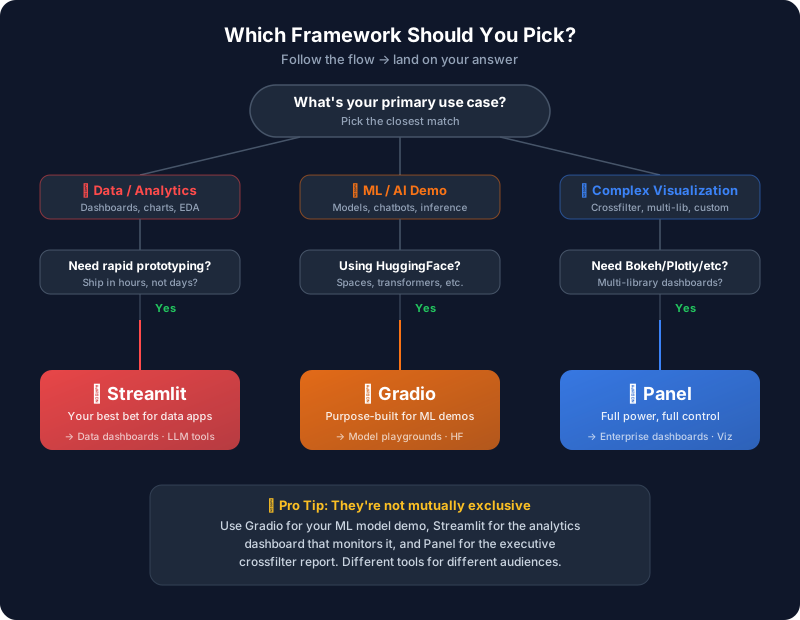
The Decision Flowchart
Still not sure? Follow this:
What’s New in 2026
Streamlit 1.58 (May 2026)
- Parallel fragments:
@st.fragment(parallel=True)runs fragments concurrently — huge for multi-widget responsiveness st.pagination: Build paged interfaces for large dataframesstreamlit skills: CLI for installing AI agent skills- Starlette backend: The migration from Tornado to Starlette (started in 2025) is now mature, improving WebSocket performance and OAuth reliability
Gradio 5.x
- Blocks API maturity: More flexible layouts with
gr.Blocksnow the recommended pattern - Improved streaming: Better token-by-token streaming for LLM chat interfaces
- Theme customization: More robust theming system with CSS variable support
- HuggingFace Spaces integration: Tighter coupling with the HF ecosystem
Panel 1.9
- Design system: New
pn.template.FastListTemplateandpn.template.MaterialTemplatefor modern-looking apps - AnyWidget support: Use any Jupyter widget as a Panel component
- Improved caching: Better
@pn.cachedecorator for expensive computations - Lumen integration: AI-powered data exploration built on Panel
Final Recommendation
Here’s my honest take after building production apps with all three:
If you’re starting a new project today and aren’t sure, start with Streamlit. It has the largest community, the most tutorials, the fastest time-to-working-app, and the lowest learning curve. You can always migrate later if you outgrow it.
Pick Gradio when your primary audience is “people trying your ML model.” The input→output paradigm, HuggingFace integration, and share=True are unmatched for that use case.
Pick Panel when you’ve hit the ceiling of what Streamlit can do. If you need multi-library visualizations, reactive updates without full reruns, or enterprise-grade dashboard complexity, Panel is the most powerful option.
The good news? They’re all open source, all actively maintained, and all free. Try building the same mini-app in all three — 30 minutes each — and you’ll know which one fits your brain.